
Minecraft requires thousands of repetitive inputs whether you are mining away stone, placing lines of blocks for massive builds, or engaging in fast-paced PvP combat. Over time, constant manual clicking causes physical finger fatigue, places unnecessary strain on your computer hardware, and reduces overall efficiency during long gaming sessions.
Automating repetitive input tasks allows players to streamline farming and building workflows without wearing out mouse hardware or risking repetitive strain injuries. However, automating your mouse clicks in Minecraft involves technical nuances. Setting your click rates incorrectly can cause client-side lag, dropped inputs, or severe account penalties on multiplayer networks.
This comprehensive guide covers optimal settings, millisecond-level timing calculations, technical engine mechanics, and anti-cheat safety rules for using an auto clicker effectively in Minecraft.
In this Article
1. Optimal Mouse Clicker Settings for Minecraft
To configure an auto clicker for maximum efficiency in Minecraft without causing performance degradation, you must understand how individual clicker parameters interact with the game engine.
| Setting Parameter | Recommended Target Value | Core Purpose & Technical Function |
| Left Click Interval | 80 ms 150 ms (6.5-12 CPS) | Maintains steady attack swings and efficient mob farming. |
| Right Click Interval | 100 ms-200 ms (5-10 CPS) | Delivers smooth block placement and rapid bridge building. |
| Click Type | Single Click | Prevents double-input errors and broken action states. |
| Activation Mode | Toggle via Hotkey (F6, F10, or Mouse 4) | Enables immediate manual override and instant toggle control. |
| Interval Variance (Jitter) | ±15 ms -35 ms Offset | Emulates human timing variation to bypass basic detection. |
Core Configuration Parameters Explained
- Click Interval & Delay: The interval defines the exact delay between consecutive mouse presses. Lower values produce faster clicks per second, but going too low forces the game engine to discard unregistered events.
- Mouse Button Selection:
- Left Click: Used primarily for mining blocks, attacking entities, and breaking objects.
- Right Click: Used for placing blocks, eating food, drawing bows, interacting with containers, and placing water/lava buckets.
- Hotkey Binds: Always bind your auto clicker activation to an easily accessible hotkey. Using function keys (such as F6 or F10) or extra thumb buttons on your mouse ensures you can instantly disable the clicker if your character falls into lava, enters an unexpected GUI menu, or engages in sudden PvP encounters.
2. Mathematical Breakdown: Timing, CPS, and Milliseconds
Auto clickers calculate input frequency using millisecond (1 second = 1000 milliseconds) delays between individual press actions. Understanding the mathematical relationship between millisecond delays and Clicks Per Second (CPS) allows you to calibrate your automation for specific in-game tasks.
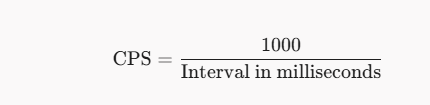
When configuring your automation tool, converting millisecond delays directly into CPS values ensures you stay within safe engine boundaries:
- An interval of 100 ms translates to 1000/100 = 10CPS
- An interval of 50 ms translates to 1000/50 = 20CPS
- An interval of 80 ms translates to 1000/80 = 12.5 CPS.
Conversion Reference Table
| Delay Interval (ms) | Calculated CPS | Primary In-Game Application | Operational Risk Level |
| 10ms | 100CPS | None (Engine Input Flooding) | Extreme (Instant Crash / Ban) |
| 50ms | 20CPS | Fast Right-Click Bridging | High (Anti-Cheat Flag Target) |
| 70 ms – 80 ms | 12.5 – 14.2CPS | Competitive PvP Combat | Moderate (Server Dependent) |
| 100ms | 10CPS | Standard Block Placement / Attack | Low (Safe baseline) |
| 150ms – 200ms | 5 – 6.6CPS | AFK Farming / Mining / Fishing | Extremely Low |
3. How Minecraft Game Engines Process Input
To optimize your software setup, you must understand how Minecraft’s underlying game loop handles mouse events across different versions. When using specialized software such as Mouse Clicker for Minecraft, configuring the tool to match the client’s internal frame cycle ensures smooth performance during long gameplay sessions.
LWJGL Input Queue Mechanics
Minecraft relies on the Lightweight Java Game Library (LWJGL) to interface with system input devices. When an auto clicker dispatches synthetic mouse messages through operating system APIs (user32.dll on Windows), LWJGL captures these events and places them into an internal input queue.
If an auto clicker generates inputs at rates exceeding 50-100+ CPS, the LWJGL queue becomes saturated. The Minecraft main render thread spends excess CPU cycles clearing unhandled input messages rather than processing frame rendering or entity updates, leading to noticeable frame drops, input latency, or game freezes.
Attack Cooldown Systems (Java 1.9+ vs. Legacy 1.8)
- Legacy Combat (Java 1.8 & Bedrock Edition): In legacy Java 1.8 and Bedrock Edition, weapon attacks carry no internal cooldown penalty. Higher CPS directly increases hit registration opportunities and applies consistent knockback to targets. However, server-side click limits still apply.
- Modern Combat (Java 1.9+): Java Edition 1.9 introduced an attack indicator cooldown represented by a sword icon under the crosshair. Each weapon type has a fixed attack speed attribute:
Sword Attack Speed = 1.6 Attacks/Second 625 ms Cooldown)
Axe Attack Speed = 0.8-1.0 Attacks/Second (≈ 1000-1250 ms Cooldown)
Attacking before the indicator fully recharges reduces damage output to as little as 20% of maximum potential. Setting an auto clicker to continuous high-speed clicking in modern versions actually reduces damage per second (DPS) compared to timed attacks.
4. Operational Profiles for Minecraft Gameplay Modes
Tailoring your auto clicker settings to specific gameplay scenarios ensures maximum productivity while preventing wasted inputs or unexpected deaths.
Profile A: AFK Mob Farms and Resource Grinding
- Target Delay: 120ms – 200ms(5 – 8CPS)
- Key Configuration: Single Left Click, Toggle Binds enabled.
- Use Case: Standing at a mob spawner, sweeping edge grinding, or breaking cobblestone generators.
- Benefits: Conserves weapon durability (when paired with Mending), avoids filling network buffers, and runs smoothly for hours in the background.
Profile B: Speed Building and Fast Bridging
- Target Delay: 80 ms 120 ms (8-12 CPS)
- Key Configuration: Single Right Click, Hold-to-Run or Toggle mode.
- Use Case: Placing continuous blocks for megastructures, nether highways, or skyblock island bridging.
- Benefits: Ensures block placement keeps pace with player movement speeds without missing placement checks or placing double blocks accidentally.
Profile C: Automated AFK Fishing
- Target Delay: 800ms – 1200ms(0.8 – 1.2CPS)
- Key Configuration: Single right-click loop with delay variance.
- Use Case: Automated fishing farms using tripwire or iron door mechanics.
- Benefits: Matches the mechanical reset cycle of bobbers without pulling the line back prematurely.
5. Risks: Server Anti-Cheat Systems and Detection
Using an external auto-clicker on multiplayer networks carries significant risk if not configured carefully. Understanding how server-side anti-cheat tools evaluate client inputs helps keep your account secure.
Server-Side Anti-Cheat Detection Vectors
Modern multiplayer servers deploy automated anti-cheat systems (such as Watchdog, GrimAC, Vulcan, or AAC) that analyze incoming player network packets in real time.
1. Zero-Variance Timing Consistency (Mathematical Regularity)
Human beings cannot click at an exact, unchanging interval over extended periods. Even skilled esports competitors exhibit millisecond-level variation due to physical reaction times and muscle jitter.
If an auto clicker generates clicks at an unvarying interval of 100.0ms for hundreds of consecutive inputs, the server’s statistical analysis algorithms calculate a standard deviation (σ) near zero. A standard deviation of zero triggers an automated flag for macro usage regardless of how low the CPS is set.
2. Unrealistic CPS Caps
Most public multiplayer servers enforce hard limits on incoming attack or interaction packets. Sustained clicking above 15-20 CPS triggers automated packet dropping, kicks for “Excessive Packets,” or temporary bans for unfair advantages.
3. Head Movement and Directional Locking
Many advanced anti-cheat systems check whether mouse input occurs while the player’s view angles (Yaw and Pitch) remain 100% static over prolonged click sequences, flagging unnatural static posture.
Safety Protocol Matrix for Multiplayer Play
| Server Category | Allowed Automation? | Recommended Action / Risk Mitigation |
| Singleplayer Worlds | Fully Allowed | 100% Safe. Configure any setting that fits your preference. |
| Private Friend Servers | Allowed with Consent | Safe. Check with the server host or administrator first. |
| Anarchy Servers (2b2t) | Generally Unregulated | Safe to Moderate. High CPS may still result in packet drops. |
| Public Minigame Networks | Strictly Prohibited | High Risk. Never use standard auto clickers on competitive servers. |
6. Comprehensive Troubleshooting Guide
If your auto clicker fails to function properly inside Minecraft, work through this step-by-step diagnostic workflow to resolve the issue:
- Problem: Auto Clicker Works on Desktop but Fails Inside Minecraft
- Cause: Operating System Integrity Level Mismatch (UIPI Blocking).
- Fix: Close the clicker utility entirely. Right-click its executable icon and select Run as Administrator. Restart the clicker and relaunch Minecraft.
- Problem: Game Lags or Drops Frames When Clicker is Activated
- Cause: Input queue saturation caused by ultra-low click delay settings (1 ms 10 ms).
- Fix: Open your auto clicker settings and increase the delay to at least 80 ms
- 100 ms (10-12 CPS).
- Problem: Clicks Register Continuously Even After Releasing the Hotkey
- Cause: Hotkey conflict with in-game keybinds or background software hooks.
- Fix: Rebind your auto clicker activation hotkey to an unassigned function key (e.g., F8 or F10) and ensure no background recording software is capturing the same key.
Frequently Asked Questions
Can using an auto clicker get my Minecraft account permanently banned?
On single-player worlds and private servers, you will not get banned. However, using an auto clicker on competitive public multiplayer servers (like Hypixel) violates their Terms of Service and will lead to account bans by automated anti-cheat systems.
What is the safest CPS setting for Minecraft mob farming?
A setting between 6 CPS and 10 CPS (100 ms – 160 ms delay) is ideal. It provides maximum killing efficiency without overloading the game engine or placing strain on system resources.
Why does high CPS not do extra damage in Minecraft 1.19+?
Minecraft 1.9 introduced weapon attack cooldown timers. Attacking before the indicator recharges drastically lowers your damage output per hit, making rhythmic, timed attacks superior to ultra-fast click spamming.
Should I use interval randomization (jitter) on my clicker?
Yes. Enabling interval randomization adds natural millisecond offsets to your clicks, preventing click patterns from appearing completely static to basic monitoring scripts.